Your production information lives in six places. Five of them are outdated.
Clier is the production information environment. Crew, cast, locations, schedule, vendors and client details go in once — and every document assembles itself from that single source. Move a flight and it’s right everywhere before you’ve closed the tab.
Spell clear the way a Spanish speaker would write it, and you get Clier. It comes out sounding the same in both languages — which is the argument for the whole product in one word. One thing, written once, read correctly by everyone who picks it up, whichever language they happen to be working in that week.
Change it once and it’s done everywhere.
The rest are now lying, quietly, to sixty people.
A location address appears on six documents.
Movement order, welcome package, tech package, rooming list, the map you sent, the WhatsApp thread. Fix one and the other five are still wrong — and nothing on screen tells you that.
A wrong pickup time isn't one mistake.
It's a driver at the wrong hotel at the wrong hour, a client alone in a lobby, and a unit that starts the day behind — repeated down every line of the movement order. The cost of a typo scales with the size of the unit.
“Is this the latest?” — asked hundreds of times.
Folders and naming conventions are not an answer to it. So the coordinator's day becomes forwarding, CC'ing, chasing, confirming receipt — invisible labour nobody values until it fails.
You rebuild the whole apparatus every job.
A studio has standing infrastructure. You spin up a full production organism, deliver it, tear it down — and start from a blank template next month in another country.
The documents are the company.
Before the first frame, the client has seen nothing of your work except PDFs. You're judged on formatting before you're judged on craft — and that judgement currently rests on whoever happened to be building the file at 11pm.
Sixteen tools, one record. Nothing is ever entered twice.
The tools are not sixteen separate apps that happen to share a login. A flight lands in the Flight Grid and the Ground Transportation tool already knows there is a pickup; the pickup lands on the movement order; the crew member behind it came from the Crew List and is already on the rooming sheet. Data flows between the tools, so every one of them is looking at the same production at the same moment.
Enter it once
A crew member, a hotel, a vehicle, a date — typed in one tool and available in the fifteen others. There is no “latest version,” because there is only one version.
Change it and it propagates
Move a flight and the pickup, the movement order, the rooming night and the calendar all follow. The Production Calendar sends; the Flight Grid notifies only the parties affected.
Every document reads the same record
Thirty documents assemble from it, in your identity, automatically — so your client sees one company looking at one production, not thirty files in six formats.
The formats come with a shape already. Clier was built inside a working service company — Costa Rica, Panama, the Dominican Republic — by the people who were filling these documents in at 11pm the night before a travel day. They've been shaped by what crews actually misread, what clients actually ask about, and what fails at 5am in someone's third language. You start from a document that has already been through a shoot, not a blank template.
Thirty documents. This is what the client sees.
Assembled from the project record, current by definition, and carrying your identity — not ours. Clier appears as a small grey mark in the footer and nowhere else. You pick one of three document voices and every document your office issues is set in it.
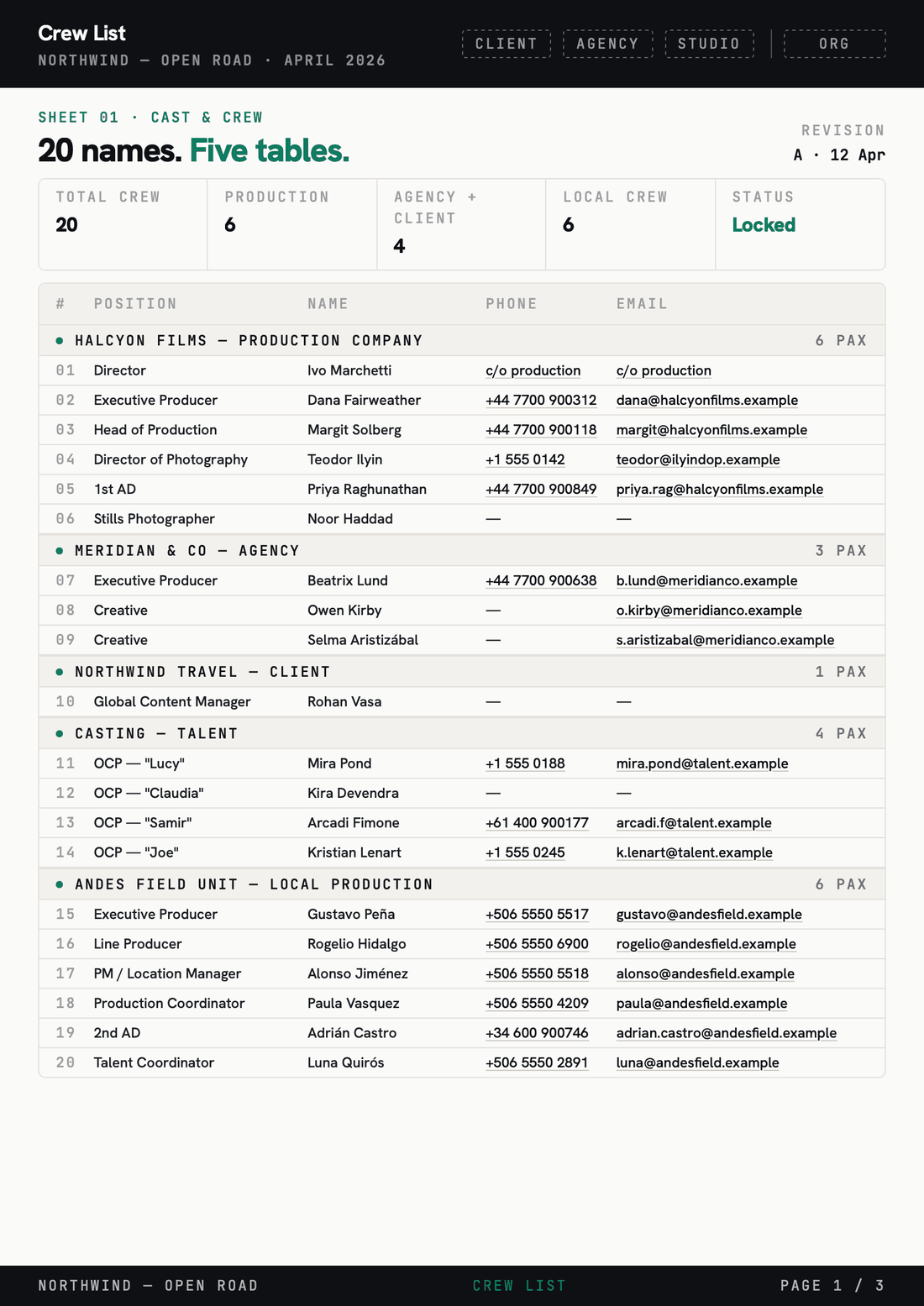
Warm white and charcoal with an emerald signal. Neutral and current — the safe choice for a client who hasn’t asked.
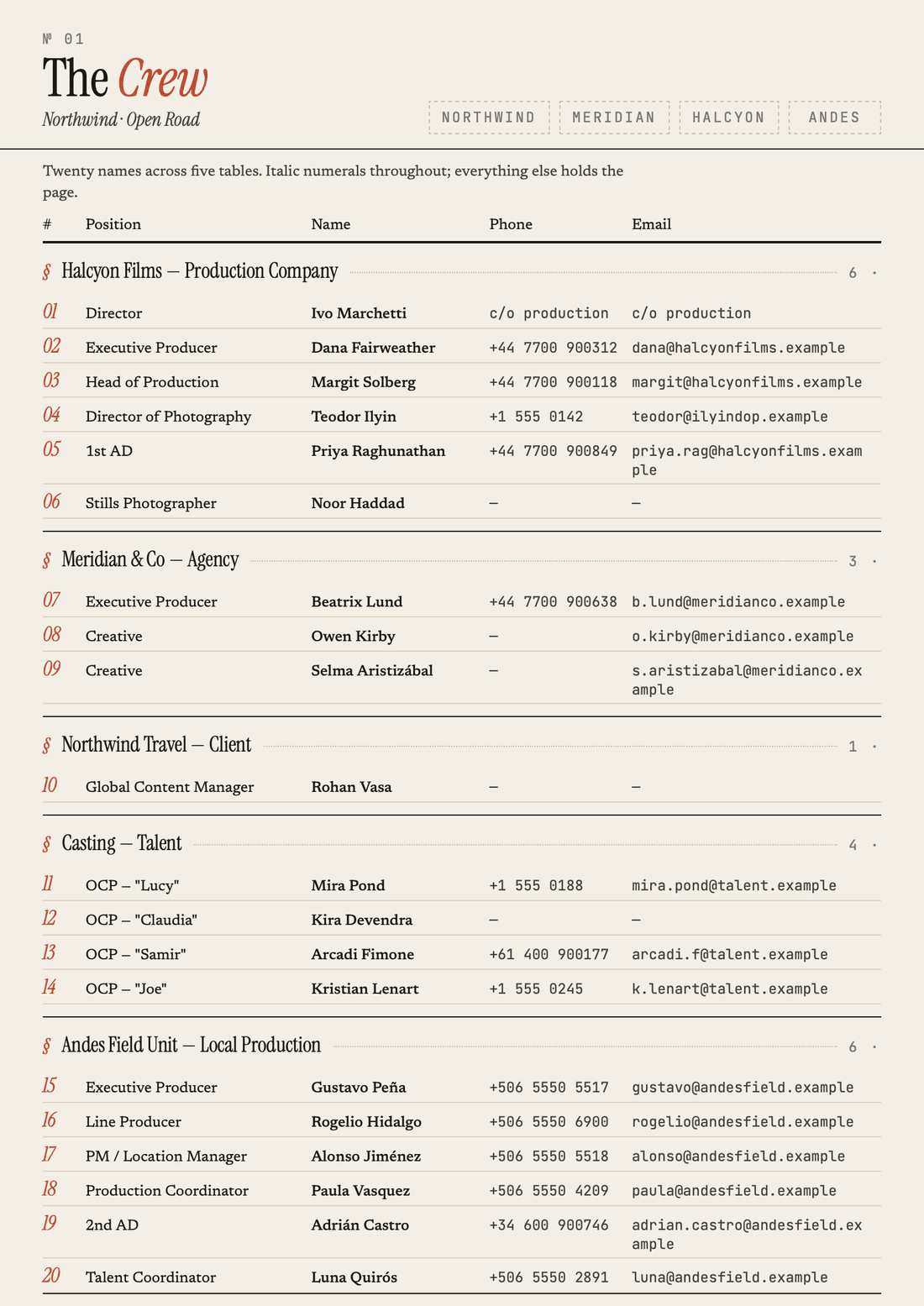
Cream paper, serif headings, vermillion accent. For companies whose paperwork should read as considered rather than operational.
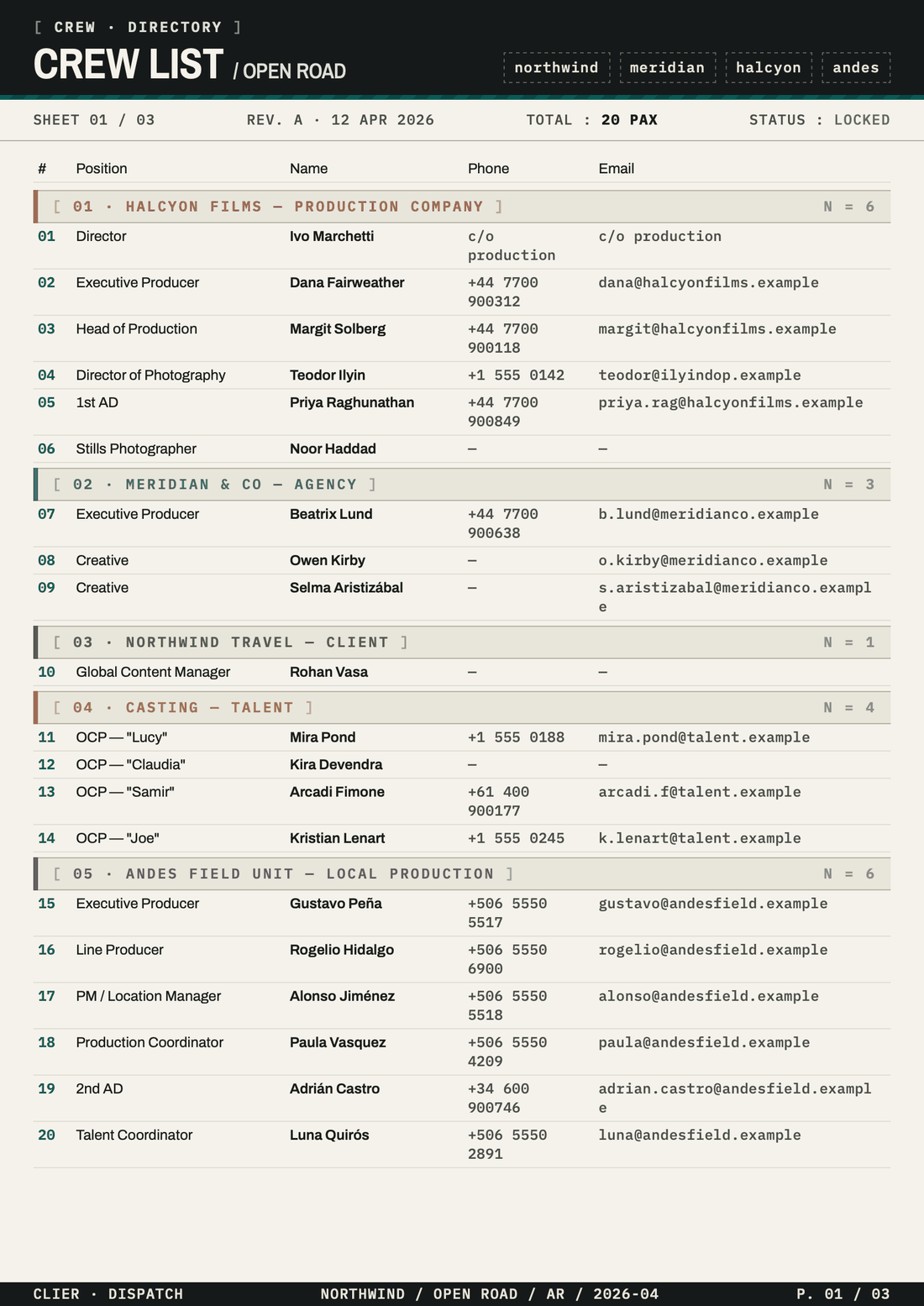
Eggshell and near-black with deep teal. Condensed and utilitarian — a dispatch board, built to be read fast and badly lit.
The voice is an org setting, not a per-document one — so nothing your client receives is ever formatted by whoever happened to build the file.
Built for the office that runs the shoot.
Your own production or a client's, at home or in another country: the job is the same — stand up a full crew, deliver it, do it again next month. Not a scripted-studio tracker with film labels on it.
The Expense Report, because petty cash is the last thing anyone wants to reconstruct.
Not the budget — the float. Cash moves faster than the paperwork behind it, so the record gets rebuilt at wrap from memory and a bag of receipts. The Expense Report is the tool that holds it: issue a float, capture receipts against it from a phone on set, settle it, and the petty cash report is already written. It stays current as the money is spent, in the currency it was spent in.
Every advance belongs to a person.
Cash is issued to a crew member or a department and stays open until it's settled. What's out and with whom is a number on a screen, so nobody has to carry it in their head or ask around at the end of the week.
Photographed at the counter, not at wrap.
Shot on a phone, coded, attached to the float before the crew member is back in the van. The report is already written by the time wrap arrives.
Local as spent. USD as reported.
Side by side, at the rate that applied on the day. Your client's number and your accountant's number reconcile because they were never two separate numbers.
The petty cash report — per spender, per float, receipts attached to the lines they belong to — plus coded actuals for whoever does the books. Budgeting and cost reporting stay where your production accountant already works.
It doesn't replace your budget software. It feeds it.
Clier is the operational layer: who, where, when, and what was actually spent on the ground. Budgeting, cost reporting and closing stay where your production accountant already works — expenses leave here coded, receipted and ready, instead of arriving as a photo of a notebook.
Actuals, with codes attached
Settled floats push out to the platform your budget already lives in, account codes intact — through the API, or through a named integration where one exists.
Exports your closing can use
CSV and XLSX built for whoever does the books, receipts attached to the lines they belong to — not a folder of images with dates for filenames.
Where your crew already lives
Dates subscribe as a calendar feed. Documents arrive as PDFs in an inbox or a thread. Nobody is asked to adopt a new app to read a pickup time.
Named connections, so nothing has to be moved by hand:
 Google DriveConnected
Documents land in the project folder you already share with your client. Your folder structure doesn't change — it just stops being maintained by hand at midnight.
 DropboxConnected
The same, for offices that live in Dropbox. Paperwork sits beside the media it belongs to, in the account your company already pays for.
 SaturationComing
Settled floats and coded actuals going straight into the budget, so what was spent on the ground meets the cost report without being retyped.
Service companies and production houses.
Teams that stand a production up from nothing.
Line producers, production managers and coordinators — running your own job or someone else's, at home or in another country. If your infrastructure is rebuilt every project, this is built for you.
Scripted studios with standing infrastructure.
If you already have permanent systems, permanent staff and a script driving the schedule, the tools built around scripts and shoot days will fit you better than this will.
Works on a phone, in the sun
Review tasks run one-handed. Structural work — finalizing, exports, budget lines — stays on desktop and says so, instead of being half-possible in a van.
Your identity, automatically
Every document carries your name and logo without anyone remembering to set it. Our mark is grey, in the footer, and that is all.
Nothing changes without a trace
Returns, deletions and reopened settlements carry who did it and why. Local currency, local time zones, English and Spanish in the same release.
Your first project is standing up by the afternoon.
No migration project, no six-week implementation, no asking your coordinator to learn a system during a shoot week.
Send one job you’ve run
A crew list, a schedule, a location list — spreadsheets in whatever state they’re actually in. We don’t need them cleaned up first; the mess is the point.
See it back as documents
Your org, your logo, your document voice, your people. You review a movement order with your own names and addresses on it — not a demo dataset with someone else’s crew in it.
Run the next one live
Your coordinator works the following production inside Clier, with us reachable during shoot weeks. One project is enough to know whether it fits your office.
Seats are for your office. Your crew doesn't need one.
You're billed for the people who build the paperwork — production, coordination, accounting — not for the sixty people who receive it. Crew and clients read documents without an account, so a unit that doubles overnight doesn't change what you pay. What scales is how many productions you have open at the same time.
Claim your Founder Rate
Twenty-five companies take 40% off Studio or Agency, and keep that rate for as long as they hold the account. Not an introductory discount that expires in three months — the price you join at is the price you renew at, while the standard rate moves with the product. Twenty-five is what we can onboard properly while still answering the phone during a shoot week. It closes at twenty-five accounts or on 31 December 2026, whichever comes first.
For a producer running their own jobs. Every tool and every document, sized for one person at a time.
- Every tool, no limits
- Unlimited crew and documents
- Your logo on every document
- Archive stays readable after wrap
For a company running back-to-back jobs. The org-level layer that makes the next project start half-built.
- Everything in Filmmaker
- Crew & vendor database across projects
- Your document templates and voice
- Org roles and permissions
- Priority support during shoot weeks
- Rate held for as long as you stay
For an office running several units at once, or producing on behalf of clients who each need their own view.
- Everything in Studio
- Agency controls across client accounts
- Ten productions open at the same time
- Seats for the whole coordination team
- Rate held for as long as you stay
Clier under your own name, for groups running several production companies or reselling to their own clients.
- Your domain and your mark — ours disappears
- Multiple orgs under one account
- Document system built to your spec
- Onboarding for each office
The questions producers actually ask.
You do. The project record is archived rather than closed — readable, searchable and exportable in full, for as long as you hold an account. Documents also land in your own Google Drive or Dropbox as they’re issued, so the paperwork exists in your storage whether or not it exists in ours.
No. Only the people working inside the system need a login — production, coordination, accounting. Crew and clients receive documents the way they already receive them. Nobody is asked to install anything to read a movement order.
A spreadsheet stores a value. Clier stores a fact, and knows every document that depends on it. That difference is invisible until the location changes at 9pm — and then it is the only thing that matters.
The document voice is an organization setting, so everything your office issues is consistent by default. Client-specific formats and a fully custom document system are what the Partner tier is for.
Both, in the same release — not a translation shipped a version late. Your team works in one language while a document goes out in the language of whoever receives it.
So do we. Local currency, local time zones and local formats are handled per production, not per account — and reported back in USD without anyone rebuilding the sheet.
Your next project, made clear — at 40% off for as long as you keep the account.
3 offices have taken it. When the 25th signs, the rate is gone and the list closes early.
A 30-minute walkthrough with your own crew list and dates — and a movement order assembled from them, under your own logo. If it doesn't fit how your office already works, we'll tell you, and you'll have lost half an hour rather than a shoot week.